Export Notes – Advance Technology With Proficient Features!
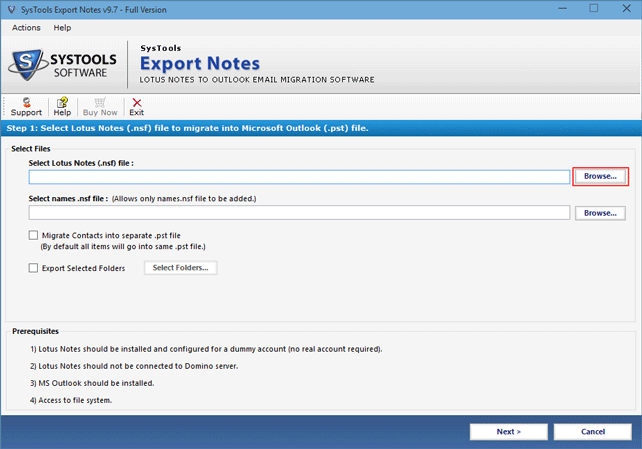
Lotus Notes Converter software is designed for Lotus Notes convert to Outlook task. Notes Converter provides a complete solution to convert Lotus Notes NSF file having Lotus Notes emails, contacts, groups, journals, calendars, to do list to Outlook. With Lotus Notes Converter Tool, you can get all your NSF items in PST format. Open & read NSF file in Outlook quickly & easily with Lotus Notes Conversion tool.
Target Complete Data Export
Lotus Notes Converter tool successfully converts with all Items such as Emails, Address Book, Calendar, Journals. It converts each and every item or folder of Lotus Notes NSF file to Outlook.
Date-Based Filtering Offered
Filters filter can be used to export particular emails belonging to user-defined range of time-span. Here, filters on Email, Calendar, Task and Journal are provided for the migration of data
Convert Notes Canonical Values
The new feature in software enables to convert canonical values of Lotus Notes in the SMTP address by offering several formats presented in the option Email Address Translation
Split Output PST File
The data of Lotus Notes can be saved into discrete PST files after conversion by mentioning the requisite size in MB or GB in the new option Split Outlook data file of the software
Omission of Email Encryption
Option to omit inbuilt encryption on NSF file email data is provided which can be checked and acquired. This will automate migration of emails in Outlook without encryption.
Bulk Conversion to Exchange
Lotus Notes Converter is able to convert all Lotus Notes database to Live Exchange Server by using Technician and Enterprise License of the software in few steps.
Map Folder to Folder
The software offered the feature to map Lotus Notes folder with Outlook existing or new folders. This facility aids other language users in the mapping of NSF folders data with their Outlook folders.
Remove Similar Contacts
While converting Names.nsf to Outlook the similar contacts get removed easily by selecting for the exclusion of contacts, which further exhibits numerous properties for the contacts deletion.
All Documents Option Available
There is a smart option to migrate all the data of "All Documents" folder. For this, check this option and all the data is exported to single folder to MS Outlook.
Maintain HTML Formatting
Another option under advance settings is HTML Formatting which can be checked to retain HTML coded messages after migration of NSF emails to MS Outlook PST file.
Internet Headers Preserved
Internet headers of all emails remain intact as Lotus Notes Converter software preserves all the properties of emails. You can check the option of Internet Headers under Advance Settings
Support All Outlook Editions
Lotus Notes to Outlook conversion tool is supportable on MS Outlook 2013 (32-bit and 64-bit) and its previous editions. The software formed PST file in Unicode format after the migration
User's View
Software has a matchless execution and the most important and admirable thing with this software is the support service we got! Our queries were resolved within few minutes and through a very easy approach we got our business license.
Mark Heald, New Jersey
It is highly recommended for organizational level transition of email platform from Lotus Notes to Outlook. Our company acquired it for the same, and got best results with very speedy and accurate conversion process. Well-designed program!
Josh Osborne, Texas
Filters for various data types, folders, calendars, etc. helped us to keep away unwanted data from exporting. It is a clever application and can be approached for desired and customized migration. Thanks for the tool!
Amenda Fox, Scotland
I am extremely thankful for the entire package of software, service, and technical support which helped me to fetch needed conversion of Notes to Outlook. Spontaneous response from your team really helped us to get results timely.
Ray Marley, Columbus
User's Queries
Will this software work without Domino Server?
Yes. Export Notes software is capable to convert NSF files to Outlook PST files without any need of Domino Server.
Is there any pre-defined size limit for NSF file to be added?
No. You can add NSF file of any size and software successfully supports large NSF files.
How to execute this conversion if NSF file is password protected?
If you have applied password to the NSF file, then use its user.id file and password applied to it to open it. Once it is opened, you can convert this NSF to PST using this tool which will prompt you for password while conversion.
Is this software capable to work on corrupt NSF files?
No. Software will not support corrupted or damaged NSF files. NSF files must be non-corrupted to proceed for the conversion to PST file.
Is there any restriction on the version of Export Notes tool?
No. Software is ready to support all the versions of IBM Notes which also includes the latest version 9.0.